Everything it does, in the order you meet it.
Writing first, then what your readers get, then the people who follow you, then the quiet work of running the place. Every feature here is on the demo right now; nothing is roadmap.
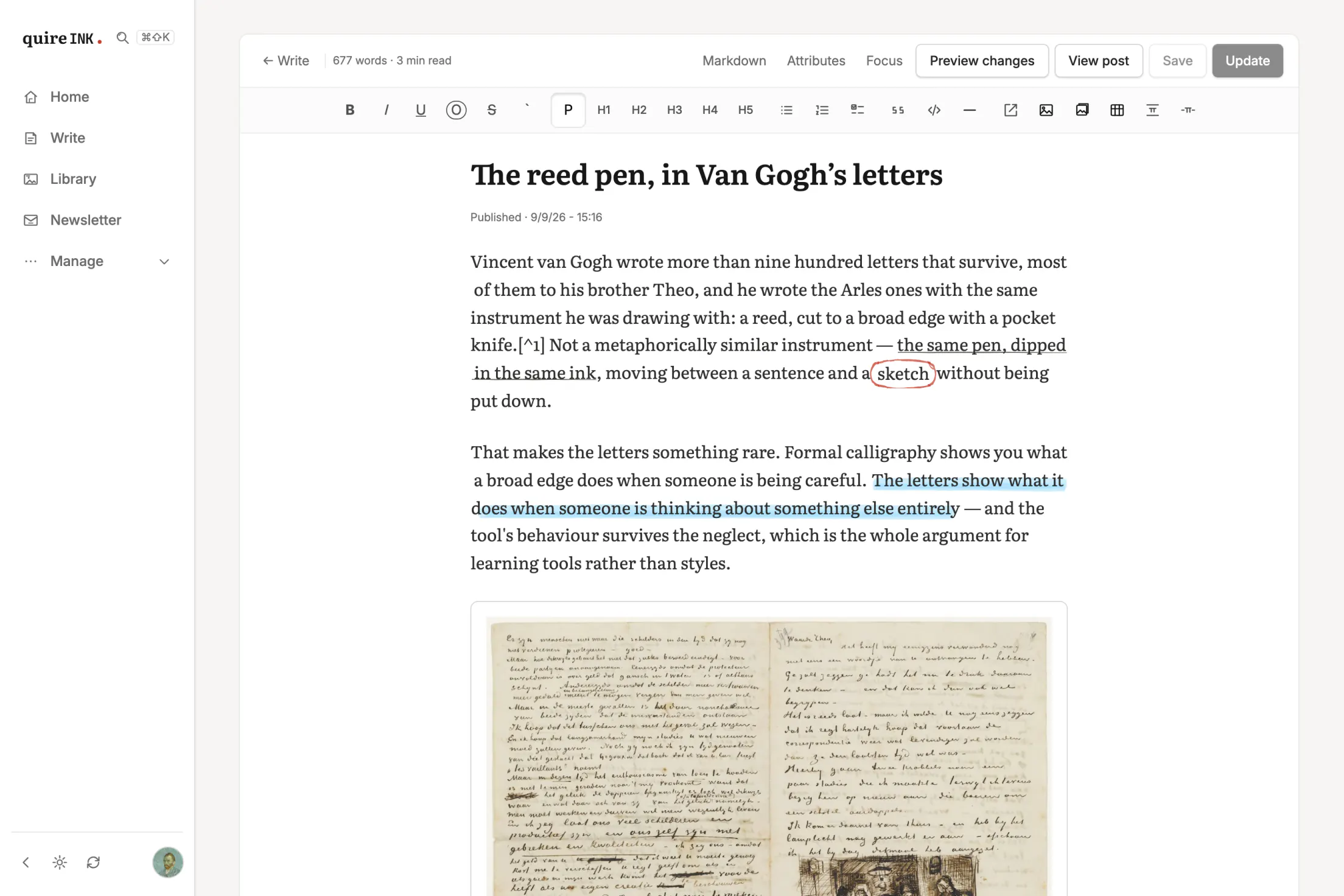
The editor gets out of the way.
You write in a clean sheet that saves as Markdown, because Markdown is what survives platforms. Everything the toolbar does, the file format can say.
A real writing surface
Headings, quotes, task lists, tables, captioned images, video, footnotes. The title grows instead of clipping, or stays empty for a short post that is only its words. The word count sits in the corner, save state is always visible, and the straight quotes you type are set as curly ones on the page, in the marks your language uses.
The Markdown is the blog's own
One engine renders the page, opens the post in the editor, saves it back and cuts the excerpt, all from a single parse. Four libraries used to do those jobs separately and drifted apart. It is measured against the specifications rather than against itself, CommonMark at 648 of 652 examples and GFM at 24 of 24 on every run, and it carries no dependencies at all.
Find and replace, in both views
One chord raises a strip under the action line, another opens replace with it. It works the same in the writing surface and in the Markdown source, so you never have to notice which one you are in first. Nothing enters the document: the hits are drawn beside it, so looking through a piece is not an edit.
Pictures that sit where you put them
A picture can hold the column, shrink to a third of it and let the words run past, or join the ones beside it as a gallery cut to one shape. Any of them can wear a frame: a mat of paper or of ink, in three weights, set on the picture or once for the whole site. Each keeps a description you can write by hand, which is what a screen reader says in its place.
Mathematics that round-trips
Type TeX, see it rendered live, click it to edit in place. Served to readers as MathML: real text a browser lays out itself, not a picture of an equation.
Code that reads like an editor
Syntax highlighting at save time, so readers never pay for it. A copy button on every block. An optional IDE-style chrome for sites about software.
Schedule it and walk away
Set a date and the post publishes itself, clears the cache, and goes out to the feed. Revisions are kept, so yesterday's version is a click back.
Per-post SEO, when you care
Title, description and social card image can be set per post. When you don't bother, sensible defaults are built from the post itself, including a generated Open Graph card.
Bring your WordPress archive
Import a WordPress, Ghost, Substack or Medium export and every post becomes Markdown, with dead shortcodes swept on the way in. The old URLs get redirects written for you, and the images are fetched into your own library right after the words arrive, so nothing keeps leaning on the old host longer than it must; where the importer stops is on the compare page.
Focus, when you want the desk clear
One switch (or Ctrl+\) takes the list of your writing and the whole button row off the screen and leaves the paper. Nothing is lost while it is away: selecting text still raises the formatting bar, and "/" still opens the inserts.
Typewriter mode, if you want it
A block caret and a soft synthesized key click, generated in the browser with no audio file. Silly, optional, and off by default. Writing should feel like something.
Draft preview by link
A draft has a preview URL you can open yourself or send to a friend, without publishing anything.
Your readers get a page that respects them.
About 100 KB for a full post, nine requests, zero third parties. No cookie banner, because there is nothing to consent to.
Your name on the page, not ours
No badge, and nothing you cannot change. A new blog’s footer ends in one “powered by Quire Ink” link; it is an ordinary line in Settings, so you rewrite it or clear it in a few seconds. After that, the only place the software names itself is a meta tag a reader never sees.
Four looks, one setting
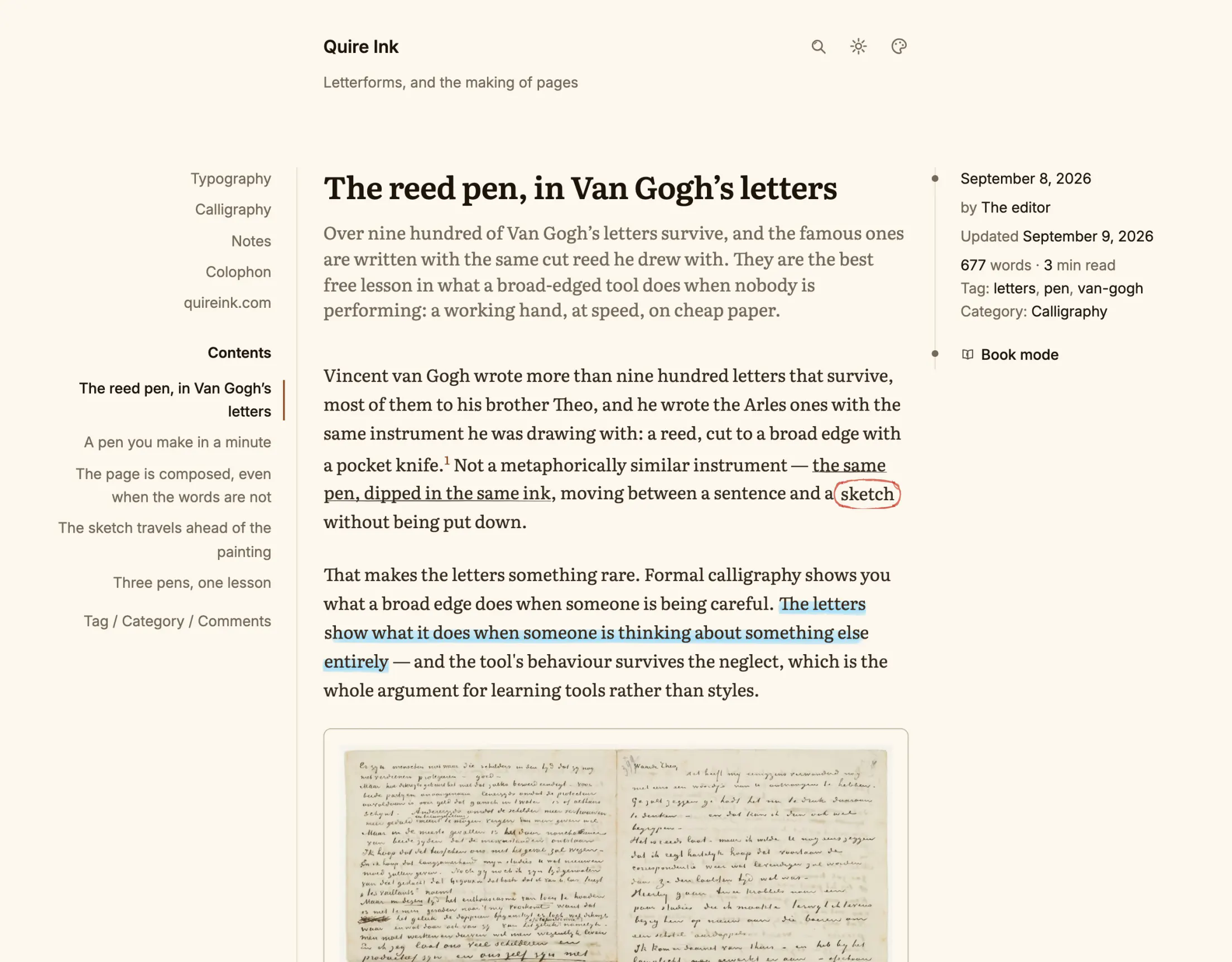
Plain paper, source code, newspaper or notebook. Source code sets every headline in its monospace and numbers the lines of your code. The newspaper puts your sections in a masthead, numbers its own sections, figures and tables, and opens a piece on a drop cap. The notebook is dot-grid paper on a desk, with links marked in highlighter. A look decides shape, type and marks and carries no colour of its own, so it comes out in whatever palette you and your reader chose.
Six palettes, drawn twice
Mono, sepia, forest, ocean, sci-fi and amber, each designed separately for light and dark rather than inverted, and each colour solved for the same contrast against its own paper so the six differ in hue and in nothing else. Readers pick their side; you pick the default.
Four reading fonts, or yours
Literata, Source Serif, Source Sans and Inter ship subset per script, trimmed to the glyphs your language uses. Or upload any font file and the site reads in it.
Book mode
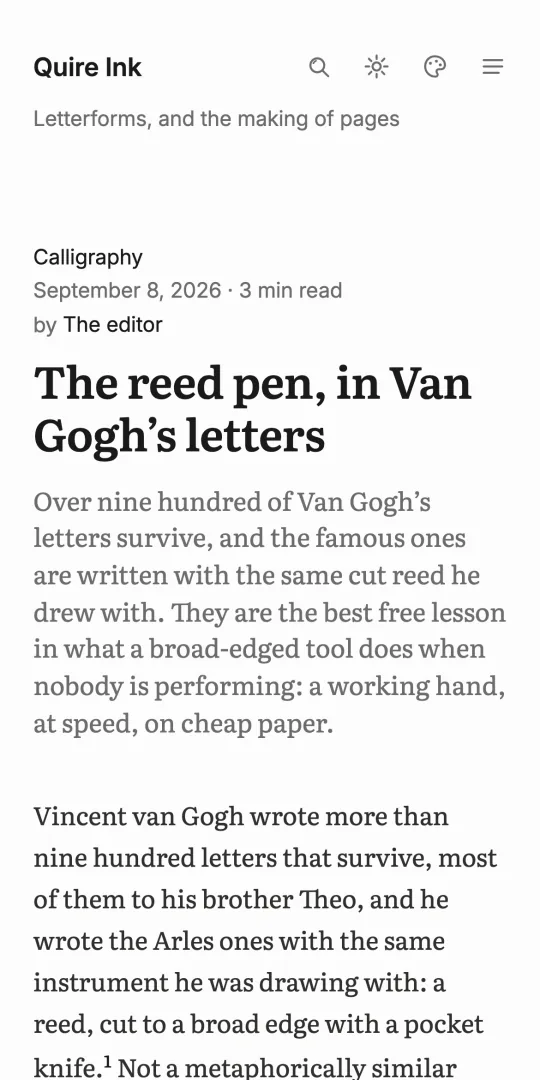
One tap sets the post in two columns with justified text and first-line indents, like a printed page, opening on a title page with the headline, the standfirst and the byline. On a phone it scrolls instead, on paper to the top of the glass, and the browser's bars get out of the way; A- and A+ set the size on both. For long essays it is a different experience entirely.
A pen, and your readers hold one too
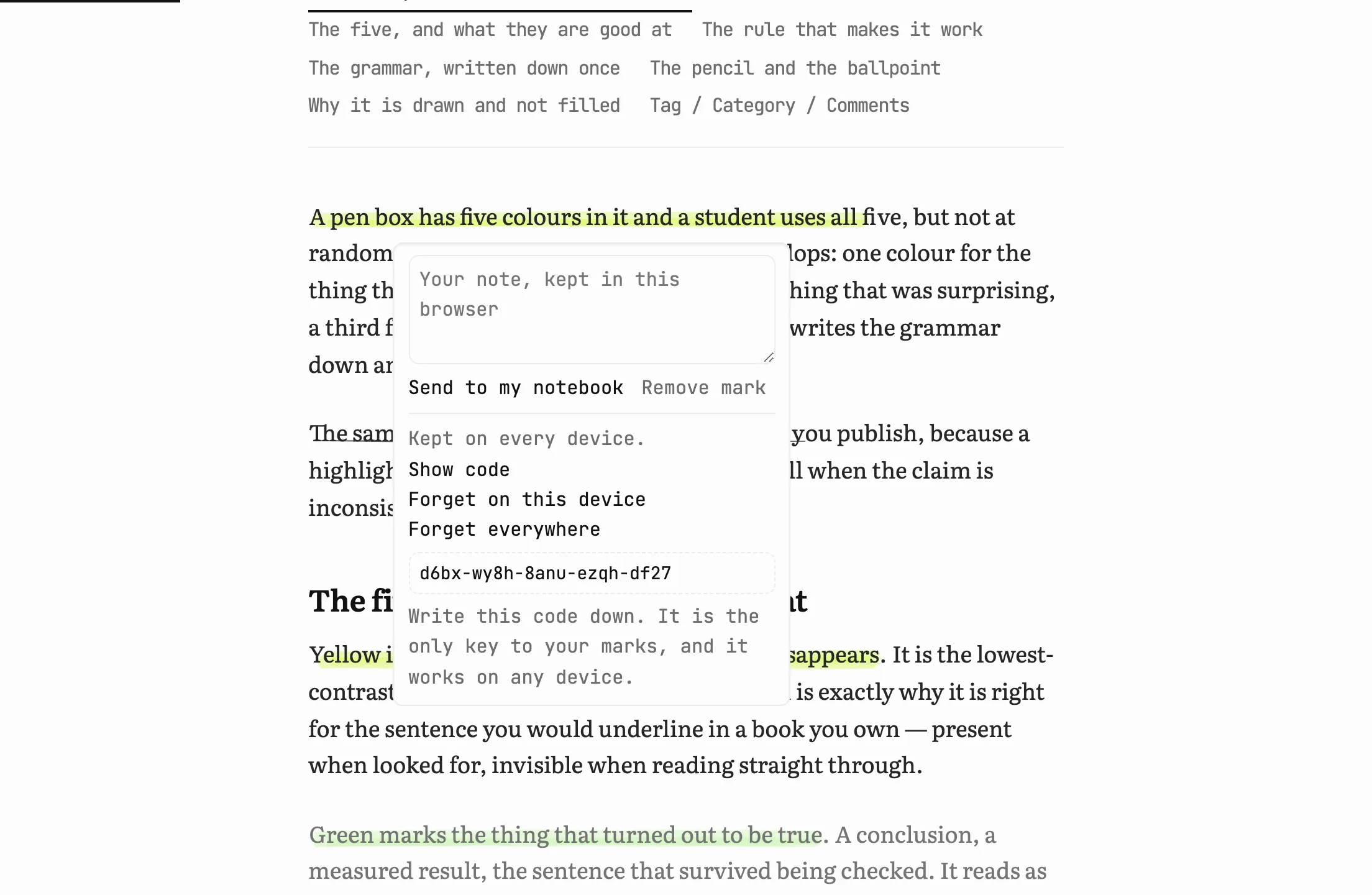
The writer can highlight in five inks, underline in pencil and ring a word in red ballpoint, every stroke drawn a little differently, the way a hand draws. Readers get the same pen if you let them: select a sentence and a bar offers the inks, the underline, the ring, a note and the quote. Their marks are anchored to the words, kept in their browser, carried across devices by a code rather than an account, and can be sent to a notebook of their own. You never see them.
Search that speaks your language
Full-text search with diacritics folded, so lap trinh finds Lập trình. Built into SQLite, no search service to run. Before anyone types, the search page offers your eight busiest tags and five newest posts.
Series, read in order
A series is read front to back in the order you set, never as a timeline. The next chapter is always one link away.
A front page with opinions
Serve the classic post list, a page you wrote, or a composed front page with a lead story and section rows. A list row reads top to bottom: category, headline with a small picture beside it if the post has one, standfirst, then the date and reading time. Sidebars are optional: one rail, two rails, or none. With one, a wide screen keeps the menu and subjects on the left and an index of years with their post counts on the right; a tablet gets the subjects as a row of chips under the header.
Progress without JavaScript
The reading progress bar is pure CSS. Links prefetch on hover through a response header. The page moves like an app without carrying one.
Take a sentence with you
Highlight anything in a post and one small control appears. It copies the sentence together with a link that opens the post at that sentence, scrolled to it and marked by the reader's own browser. Paste it into a message and the person on the other end lands where you were, not at the top of a long essay. Nothing is sent anywhere: no account, no third party, no request at all.
It prints like a page
Press Ctrl+P on any post and you get the essay: the masthead, the words, the notes, the tags. No progress bar, no buttons that do nothing on paper, no comment thread, no footer. Headings do not sit alone at the foot of a page, tables are not cut in half, code wraps instead of losing its right edge, and a link that leaves the site prints its address. Reading at night gives you ink on paper, not a black page.
The people who follow you are yours, not a platform's.
The subscriber list lives in your database. Export it any time; nobody can hold it hostage, including us.
A newsletter without a service
Double opt-in sign-up, a broadcast composer, and your own SMTP. Pick several posts and they go out as one digest, never a flood of single emails.
A send log that tells the truth
One row per email that left the machine, success or failure, with the error kept. Open rates per subscriber. A double-send guard asks before a post goes out twice.
Test sends that mean something
The test email is built by the same code as the real one, so a green test means the live send works. The classic 465-versus-587 TLS mistake is caught for you.
Comments, if you want them
Off by default. Three levels of threading, bold and italic only, nothing else survives. Sign in with Google or just a name, with optional Turnstile to keep the bots out.
Comments stay instant
Pages are cached hard, but the comment thread is always read live. A new comment appears without anyone waiting for a cache to expire.
Feeds and the open web
RSS, a sitemap, real Open Graph cards, and a PWA manifest so the blog can live on a phone's home screen. The plumbing of the open web, present and correct.
The daily work fits in your pocket.
The admin is behind your sign-in and works from a phone. Everything you change takes effect on the next request, because the cache empties itself.
Every delete is a soft delete
Trash keeps posts, pages, images and files until you say otherwise. Restore never collides, because a trashed post still owns its address. Purging an image that a live post still uses gets stopped and asks you twice.
Analytics with no vendor
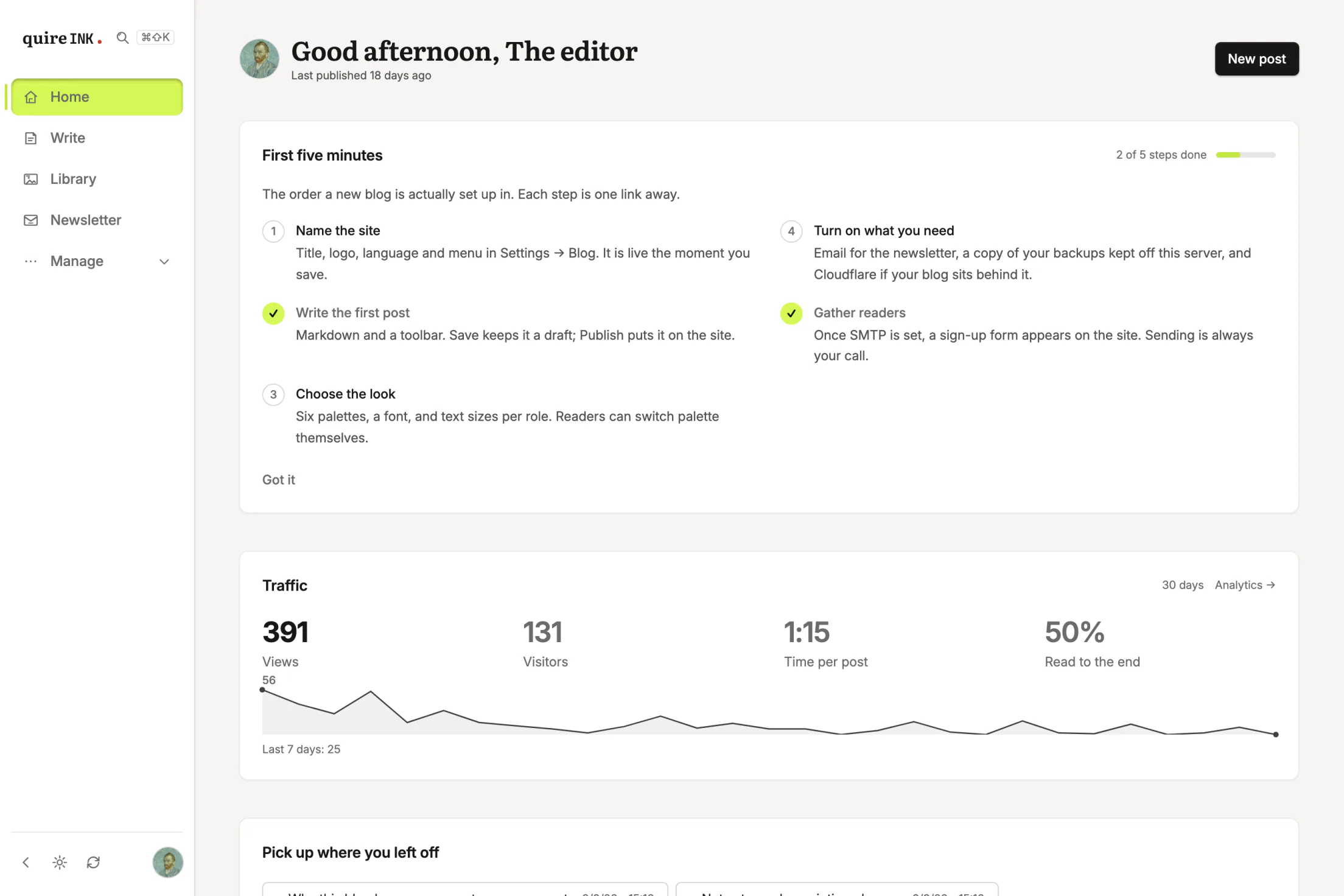
Page views, scroll depth, referrers and devices, recorded in your own database with no cookies and no third party. Nothing to disclose, because nothing leaves.
One clock, chosen by you
Pick the site's timezone once, in Settings, and everything reads from it, on the public pages and in the admin alike: the date under every post, the archive's month markers, comment times, the newsletter's date line, the day a chart starts on. Leave it empty and the blog uses ANALYTICS_TZ, then UTC, never the server machine's own zone, so moving the server moves no date on the site.
Backups you can hold
One button downloads the entire blog. Scheduled snapshots keep the last few on the server. An off-server script copies hourly to storage you own. All three are the same archive, and restoring is a documented shell procedure, not a prayer.
Sign-in that takes itself seriously
Password plus TOTP two-factor plus printed recovery codes, and a passkey beside them: one fingerprint, face or device PIN and you are in, with no code to type and nothing a fake page could phish. A passkey is a second door, never the only one, and it belongs to the blog's address, so a blog moved to a new domain signs in with the password and code there. One owner account, enforced in code. Settings has a Security screen: add or remove passkeys, change the password, re-enrol the authenticator, print a fresh set of codes, and see every signed-in device with a button to end it — one at a time or all of them. And a way back in for the day the password and the phone are both gone.
Setting it up needs no terminal
A blog nobody owns yet prints a one-time link in its own log, and that link is the whole account step: username, password, two-factor, all in a browser. Where nobody reads a log, set SETUP_CODE and the setup page asks for it instead. A NAS log panel is enough — no docker exec, no interactive shell. Reading the log still proves the machine is yours, which is why the link is there and not simply a page anyone could find.
Everything by name
Seven tabs of settings, each grouped by the question you are holding rather than by the part of the software a control belongs to, and each printing that question under its own name. Remembering which tab held which control was still a memory test, so ⌘K opens a box: type "excerpt" or "sepia" or "backup" and it takes you to the control — 111 of them are indexed by name. The same idea is what lets a connected assistant reach all 166 writable settings by path, instead of the three it used to be allowed.
Eleven languages
The interface speaks English, Vietnamese, German, Japanese, Chinese, Korean, French, Spanish, Portuguese, Italian and Russian. You pick one as the first question of setup, and it reaches all the way down: the Help page, the dates in the admin, the plural of every count. A build check keeps every string of every language in sync, down to which quotation marks each language uses. Each language is one file at the repository root, so the community can improve a translation or add a new one without learning the codebase.
Nothing of ours on your screens
The footer is your own line or nothing. The wordmark in the admin has a switch, and so does the version line at the foot of the dashboard. The only place the software still says its name is a meta tag.
One motion switch
Menus arrive, panels settle, a page turn fades. One switch in Settings stops all of it, on the site, the sign-in page and the admin alike, and a reader who asked their device for less motion gets less without asking you.
An activity log
Every meaningful action is a line: what happened, when, from where. When something looks odd, you read history instead of guessing.
A dot that says a release is out
Once a day, on the first visit it gets, the blog asks what the newest release is and wears the answer beside its version number: amber when an update exists, green when you are on it. The request carries the version it runs and nothing about you or your readers, and one switch turns it off. Installing stays your act.
Built for the web that AI agents read and write.
Most platforms bolt this on. Quire Ink treats an agent as a first-class visitor with its own front door.
A working MCP server
Connect Claude or another assistant and it can draft, publish, edit and organise through the exact rules you use. Not a webhook and a prayer: a real protocol with real tools.
An assistant lives in the admin
No MCP client? Plug any API key into Settings — Anthropic, OpenAI, Gemini or DeepSeek — and the sidebar grows an Assistant page: ask "how did the blog do this week?", "sweep the comments for spam", "switch to the sepia palette" and it does it, through the same rules you use, every action logged. The answer arrives as it is written rather than in one lump, every conversation is kept and listed, and each one carries a receipt of what it cost. Your key, your model, your bill.
An agent that stewards, not just types
The tools read as well as write: your traffic compared to last week, comments swept for spam into the trash, the whole archive searched for posts that should link to each other. A Monday report is one sentence to ask for; the cookbook has the prompts. What it never sees: your readers' addresses.
Access you control
Tokens are created in the admin, shown once, stored hashed, and expire on their own. Delete one and that agent is out, immediately, no support ticket.
Markdown on request
Any post URL answers with its Markdown source when an agent asks for it, and llms.txt lists what is worth reading. Agents get the text you wrote, not HTML to reverse-engineer.
The same rules for everyone
An agent's publish goes through the same slug checks, revisions, soft delete and cache clearing as yours. There is no side door to leave ajar.